


Full Control
Personal Programs
Flexible Management
Easy Setup
Fault Information
Access from anywhere in the world
MELCloud Home: Next-Generation Control
Mitsubishi Electric introduces a new generation app for managing air conditioning and heating systems. Built entirely from the ground up, it replaces the previous MELCloud app with a modern interface, improved usability, and all the familiar features you’re used to.
Whether you’re at home, in the office, or managing multiple properties, the app provides easy, secure, and flexible control of your devices – via smartphone, tablet, or computer.
Key Benefits and Feature
- Centralized device management
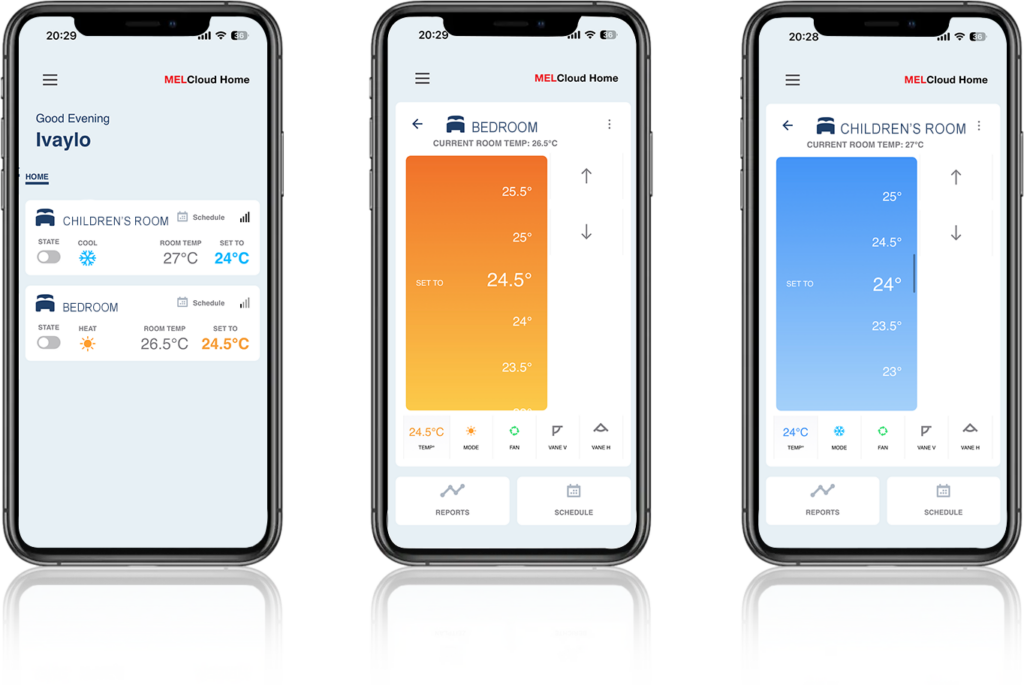
With the app, you can easily adjust temperature, fan speed, operating modes, and weekly schedules – quickly and conveniently
- Control over energy consumption.
Track energy consumption easily and transparently -for more efficient cost management.
- Work mode.
Create preset modes such as “Away,” “Vacation,” or “Eco Mode,” and activate them easily whenever you need.
- Management of multiple locations.
Control multiple systems simultaneously – conveniently and efficiently.
- Push notifications.
Automatic notifications for maintenance, faults, or important events.
- Secure cloud connection.
Secure access via Wi-Fi or mobile network.
A New Approach to Control
- The app impresses with a refreshed interface- functional,
intuitive, and easy to use. From the moment it launches, users get a structured overview of all connected devices and their current status.
- Key Improvements in Detail:
Context-Aware Contro
The displayed features adapt automatically to the specific device. Only the relevant settings are shown, ensuring maximum clarity and faster access to the most frequently used functions.
Personalization and Efficiency
The “Favorites” feature provides quick access to your preferred settings, while push notifications keep you informed of maintenance needs or errors.
Maximum Flexibility Through an Adaptive Interface
The app is optimized for smartphones and tablets, offering equally convenient use across all platforms. It can also be accessed via browser – at the office, at home, or while working remotely.
Getting Started and Installation
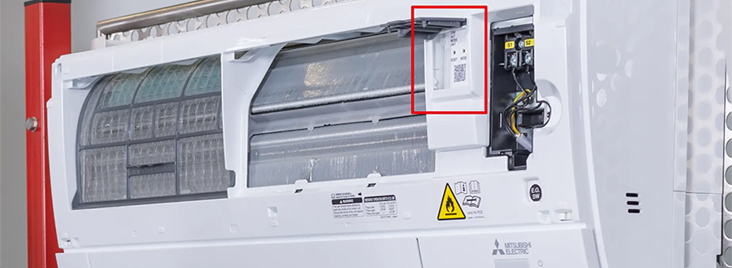
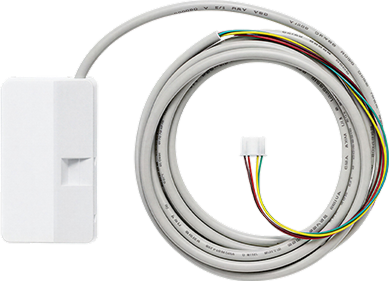
The necessary information can be found on the bottom part of the unit. If you can’t find it there, refer to the image below, which shows the position of the Wi-Fi adapter on a wall-mounted air conditioner.
To control an air conditioning or heating system with MELCloud Home, the system must meet several basic requirements:
- A compatible Mitsubishi Electric device. For example, an air conditioner or heat pump that supports MELCloud.
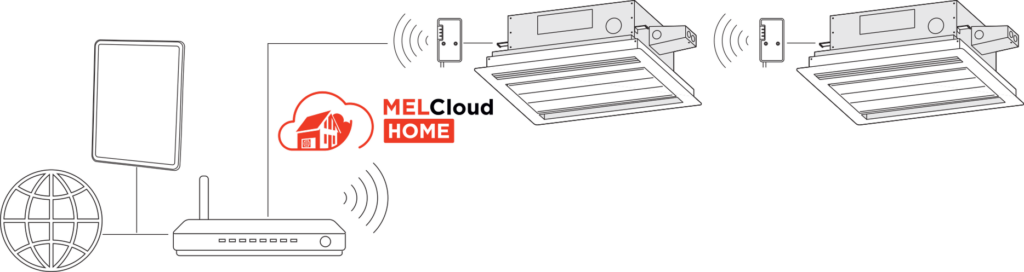
- A suitable adapter for internet connectivity. An adapter that connects the device to the internet is required.
- "Wi-Fi adapter MAC-567IF-E1 or a newer model — for connection via the home Wi-Fi network.
- Wi-Fi router. It is recommended that the router have a WPS function — a button that allows devices to connect quickly and easily.
Depending on the model, the Wi-Fi adapter can be connected in several ways: via Bluetooth for the MAC-597 model, via a WPS button if the router supports this function, or via Access Point mode. Detailed step-by-step instructions for installing the Wi-Fi adapter can be found in our video guides.
- Download the app for free. Open the App Store or Google Play.
- Register and log into your account. Create a user account.
- Connect the adapter. Pair the Wi-Fi adapter with the device.
- Add a device. Select an air conditioning system or heat pump.
- Set the operating preferences. Program the desired system functions.
Using the App and Its Features
Can I connect MELCloud Home to Amazon Alexa?
Yes. MELCloud Home can be connected to Amazon Alexa for convenient voice control of your Mitsubishi Electric devices. Whether it’s an air conditioning or heating system, once the devices are connected to the router via a Wi-Fi adapter and set up in the app, you can activate preset programs using voice commands.
How to create a „Schedule“?
With the “Schedule” feature, you can control your devices automatically at set times – daily or according to a weekly program. Similar to classic hardware controllers, you can define specific operating periods, for example, to turn the system on or off.
To create a schedule, select the desired device in the app and tap “Schedule” in the bottom right corner. There you can individually set the hours and days of the week on which specific commands should be executed.
Important: To avoid conflicts with other control methods, it is recommended that you use only the schedule in MELCloud Home while actively using the app.
MELCloud Home - Frequently Asked Questions
Is there a maximum allowed distance between the adapter and the router?
This depends on the specific conditions in your home or building. It is recommended that the Wi-Fi adapter be positioned as close to the router as possible. If necessary, Wi-Fi range extenders from other manufacturers can be used.
Can I use a Wi-Fi interface from another manufacturer?
No. Only original Mitsubishi Electric Wi-Fi adapters are supported.
Is my device compatible with MELCloud Home?
All Wi-Fi adapters from the MAC-567IF-E series and newer are compatible with MELCloud Home.
What are the steps for switching from MELCloud Residential to MELCloud Home?
To switch from MELCloud Residential to MELCloud Home, first log into your MELCloud Residential account and delete the registered devices. Then remove the app from your phone. Download the MELCloud Home app, create a new account, and register your devices again.
The device has already been connected, but there is no internet connection. What should I do?
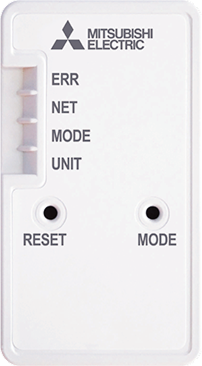
Check whether the “NET” and “Unit” LED indicators are blinking green in sequence every 5 seconds. If this is not the case, it is recommended that you restart the MELCloud Wi-Fi adapter.
Restart the adapter or repeat the pairing process – via Bluetooth, Access Point mode, or WPS. See the “How is the MELCloud Wi-Fi Adapter Installed?” section.
After re-pairing, the adapter will usually reconnect automatically in the event of future network interruptions.
блог статии, които може да харесате
Air-to-Water Heat Pump: Frequently Asked Questions
06.08.2025
Air-to-water heat pumps are rightly considered the future of sustainable heating—but this is far from the only reason why more and more people are choosing...